
Legal
SMS Opt-In & Consent
How we collect consent to text you, what we send, and how to stop it.
Privacy Policy Terms of Service support@affirmpax.com
Our commitment
We do not share, sell, rent, or otherwise provide your mobile phone number, SMS consent, or opt-in information to any third parties or affiliates for marketing or promotional purposes. Text messaging originator opt-in data and consent will not be shared with any third parties, except as necessary to deliver the messages through our SMS service provider.
How opt-in works
All consent is collected inside the AffirmPax mobile app for iOS and Android. There is no website, keyword, or paper opt-in path. Consent is never pre-checked, never bundled with another agreement, and is always shown at the moment the phone number is entered.
Path 1 — Account phone verification
During registration the user enters their own mobile number. The disclosure below the Continue button reads:
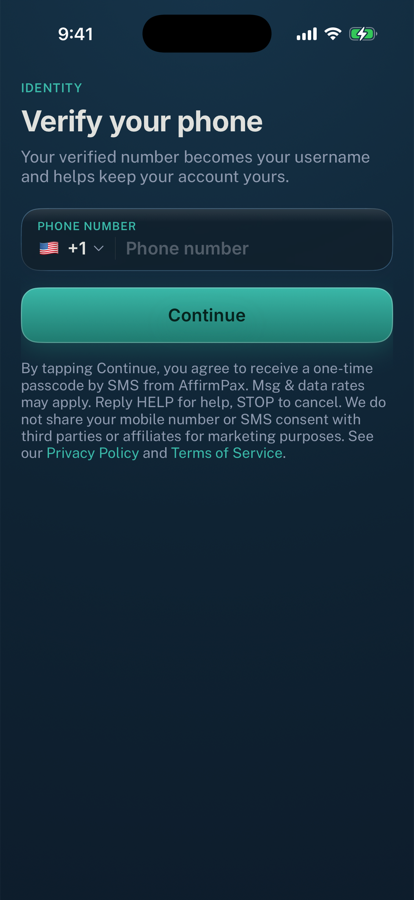
By tapping Continue, you agree to receive a one-time passcode by SMS from AffirmPax. Msg & data rates may apply. Reply HELP for help, STOP to cancel. We do not share your mobile number or SMS consent with third parties or affiliates for marketing purposes. See our Privacy Policy and Terms of Service. A single passcode is sent only after the user taps Continue. “Privacy Policy” and “Terms of Service” are tappable links to the pages linked above.
Path 2 — Designated emergency contact
A verified user may designate one emergency contact, confirming in the app that they have that person’s permission. The disclosure above the Add contact button reads:
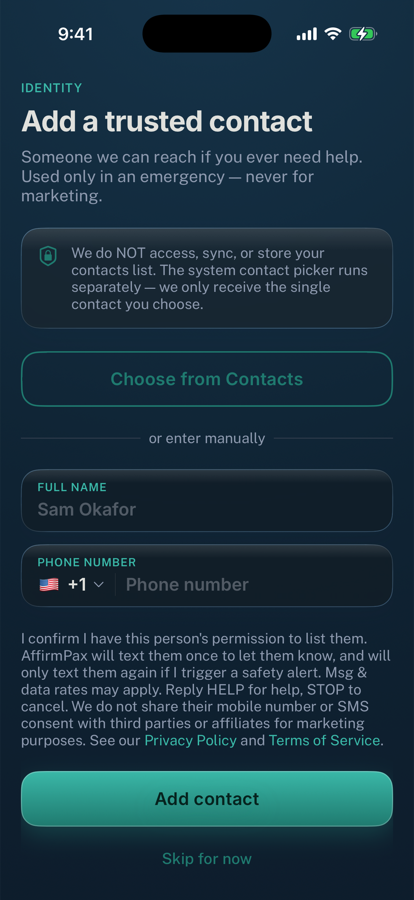
I confirm I have this person's permission to list them. AffirmPax will text them once to let them know, and will only text them again if I trigger a safety alert. Msg & data rates may apply. Reply HELP for help, STOP to cancel. We do not share their mobile number or SMS consent with third parties or affiliates for marketing purposes. See our Privacy Policy and Terms of Service. AffirmPax then texts that contact once to tell them who added them and how to opt out. A contact who replies STOP receives no further messages of any kind.
Messages we send
| Message | When | Example |
|---|---|---|
| Verification code | Once, when the user verifies their own number | Your AffirmPax verification code is: 123456 |
| Emergency-contact notice | Once, when someone designates that person as their contact | AffirmPax: Alex added you as their emergency contact. You will only receive a text from this number if they trigger a safety alert. Msg frequency varies. Msg & data rates may apply. Reply HELP for help, STOP to opt out. |
| Safety alert | Only when the user actively triggers a safety check | AffirmPax Safety Alert: Alex may need help. They triggered a safety check in the app. Last known location: 34.0522, -118.2437 |
Message frequency varies and is very low; most users receive only one message ever. Message and data rates may apply. No marketing or promotional messages are ever sent.
How to opt out
Reply STOP to any message to stop all further texts, or HELP for help. Replying STOP also stops safety alerts, which means AffirmPax can no longer reach that number in an emergency. Reply START to resubscribe.